Serilog.Sinks.Debug 3.0.0
Serilog.Sinks.Debug 


A Serilog sink that writes log events to the Visual Studio debug output window.
Getting started
To use the sink, first install the NuGet package:
dotnet add package Serilog.Sinks.Debug
Then enable the sink using WriteTo.Debug():
Log.Logger = new LoggerConfiguration()
    .WriteTo.Debug()
    .CreateLogger();

Log.Information("Hello, world!");
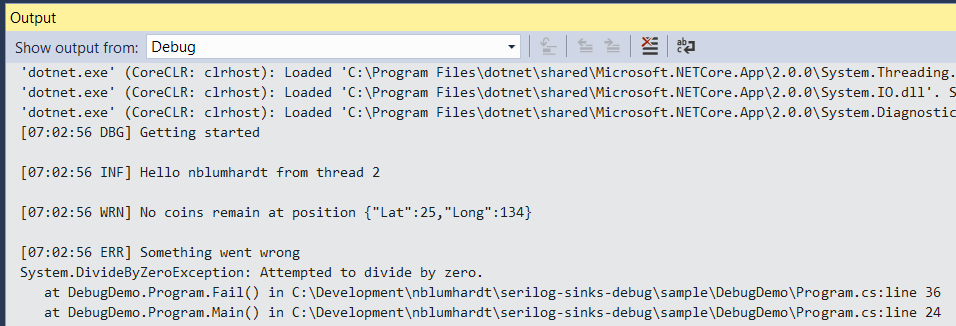
Log events will be printed to the debug output:
XML <appSettings> configuration
To use the sink with the Serilog.Settings.AppSettings package, first install that package if you haven't already done so:
Install-Package Serilog.Settings.AppSettings
Instead of configuring the logger in code, call ReadFrom.AppSettings():
var log = new LoggerConfiguration()
    .ReadFrom.AppSettings()
    .CreateLogger();
In your application's App.config or Web.config file, specify the console sink assembly under the <appSettings> node:
<configuration>
  <appSettings>
    <add key="serilog:using:Debug" value="Serilog.Sinks.Debug" />
    <add key="serilog:write-to:Debug" />
JSON appsettings.json configuration
To use the console sink with Microsoft.Extensions.Configuration, for example with ASP.NET Core or .NET Core, use the Serilog.Settings.Configuration package. First install that package if you have not already done so:
Install-Package Serilog.Settings.Configuration
Instead of configuring the sink directly in code, call ReadFrom.Configuration():
var configuration = new ConfigurationBuilder()
    .AddJsonFile("appsettings.json")
    .Build();

var logger = new LoggerConfiguration()
    .ReadFrom.Configuration(configuration)
    .CreateLogger();
In your appsettings.json file, under the Serilog node, :
{
  "Serilog": {
    "WriteTo": ["Debug"]
  }
}
Copyright © 2017 Serilog Contributors - Provided under the Apache License, Version 2.0.
Showing the top 20 packages that depend on Serilog.Sinks.Debug.
| Packages | Downloads |
|---|---|
|
Serilog.AspNetCore
Serilog support for ASP.NET Core logging
|
1,314 |
|
Serilog.AspNetCore
Serilog support for ASP.NET Core logging
|
1,253 |
|
Serilog.AspNetCore
Serilog support for ASP.NET Core logging
|
65 |
|
Avalonia
The Avalonia UI framework
|
52 |
|
Avalonia
The Avalonia UI framework
|
51 |
|
Avalonia
Avalonia is a WPF/UWP-inspired cross-platform XAML-based UI framework providing a flexible styling system and supporting a wide range of Operating Systems such as Windows (.NET Framework, .NET Core), Linux (via Xorg), MacOS and with experimental support for Android and iOS.
|
51 |
|
Avalonia
Avalonia is a WPF/UWP-inspired cross-platform XAML-based UI framework providing a flexible styling system and supporting a wide range of Operating Systems such as Windows (.NET Framework, .NET Core), Linux (via Xorg), MacOS and with experimental support for Android and iOS.
|
49 |
|
Serilog.AspNetCore
Serilog support for ASP.NET Core logging
|
48 |
|
Serilog.AspNetCore
Serilog support for ASP.NET Core logging
|
47 |
|
Avalonia
Package Description
|
46 |
|
Serilog.AspNetCore
Serilog support for ASP.NET Core logging
|
45 |
|
Avalonia
Avalonia is a WPF/UWP-inspired cross-platform XAML-based UI framework providing a flexible styling system and supporting a wide range of Operating Systems such as Windows (.NET Framework, .NET Core), Linux (via Xorg), MacOS and with experimental support for Android and iOS.
|
44 |
|
Serilog.AspNetCore
Serilog support for ASP.NET Core logging
|
43 |
|
Avalonia
Avalonia is a WPF/UWP-inspired cross-platform XAML-based UI framework providing a flexible styling system and supporting a wide range of Operating Systems such as Windows (.NET Framework, .NET Core), Linux (via Xorg), MacOS and with experimental support for Android and iOS.
|
43 |
|
Serilog.AspNetCore
Serilog support for ASP.NET Core logging
|
42 |
| Version | Downloads | Last updated |
|---|---|---|
| 3.0.0 | 1,289 | 12/10/2025 |
| 3.0.0-dev-00040 | 26 | 12/10/2025 |
| 2.0.0 | 1,271 | 12/10/2025 |
| 2.0.0-dev-00026 | 19 | 12/16/2025 |
| 1.0.2-dev-00023 | 23 | 12/10/2025 |
| 1.0.2-dev-00020 | 28 | 12/10/2025 |
| 1.0.2-dev-00018 | 26 | 12/10/2025 |
| 1.0.1 | 30 | 12/10/2025 |
| 1.0.1-dev-00015 | 25 | 12/10/2025 |
| 1.0.0 | 26 | 12/10/2025 |
| 1.0.0-dev-00009 | 25 | 12/10/2025 |
| 1.0.0-dev-00007 | 31 | 12/10/2025 |
| 1.0.0-dev-00004 | 28 | 12/10/2025 |
| 1.0.0-dev-00002 | 28 | 12/11/2025 |