NuGetizer 1.2.2
NuGetizer is a drop-in replacement for the .NET SDK built-in Pack (a.k.a. "SDK Pack") which instantly supercharges your ability to customize and extend the packing process in a consistent and easy to understand process designed and centered around best practices in MSBuild design and extensibility.
Yes, this means you'll never need to write a .nuspec by hand ever again, no matter how complicated or advanced your packing scenarios are.
Comprehensive and intuitive heuristics built from experience building nuget packages for over a decade make getting started with NuGetizer seamless and easy, while still accomodating the most advanced scenarios through plain MSBuild extensibility. Out of the box, NuGetizer supports:
- Drop-in replacement for the built-in .NET SDK Pack
- Packing project references (including transitive references)
- Straightforward support for smart libraries packing needs
- Packing multi-targeted projects, including framework-specific resources and dependencies
- Fast iterative development with complementary dotnet-nugetize command line tool
- Comprehensive diagnostic analyzers to provide guidance on packing best practices
- Consistent and predictable naming for package content inference behaviors:
Pack=[true|false]=> Include/exclude from package (on any item, such asPackageReference,ProjectReference,None,Content, etc.)PackFolder=[folder]=> Name of known folders with special behavior, such asLib,Build,Content,Tools, etc. (as a project property or item metadata)PackagePath=[path]=> Package-relative path (on any item, such asNone,Content, etc.)Pack[Item Type]=[true|false]=> Set default pack behavior for all items of a given type via simple properties (such asPackNone,PackContent,PackBuildOutput,PackDependencies,PackFrameworkReferences,PackEmbeddedResource,PackResourceetc.)
- Packaging projects using
.msbuildprojand Microsoft.Build.NoTargets SDK - SourceLink support to populate repository information in the package
- Automatic
readme.mdinclusion in the package - Support for content includes in readme
- Package validation enabled by default for release multi-targeting packages.
It's strongly recommended that you install the dotnet-nugetize tool to get the best experience with NuGetizer:
dotnet tool install -g dotnet-nugetize
Given the following project:
<Project Sdk="Microsoft.NET.Sdk">

  <PropertyGroup>
    <TargetFramework>netstandard2.0</TargetFramework>
    <GenerateDocumentationFile>true</GenerateDocumentationFile>

    <PackageId>Quickstart</PackageId>
    <Authors>NuGetizer</Authors>
    <Description>NuGetized quickstart</Description>

    <PublishRepositoryUrl>true</PublishRepositoryUrl>
  </PropertyGroup>

  <ItemGroup>
    <PackageReference Include="NuGetizer" />
    <PackageReference Include="Microsoft.SourceLink.GitHub" Version="1.1.1"
                      PrivateAssets="all" />
    <PackageReference Include="Newtonsoft.Json" Version="13.0.1" />
  </ItemGroup>

  <ItemGroup>
    <None Include="none.txt" Pack="true" />
    <Content Include="content.txt" Pack="true" />
    <Compile Update="@(Compile)" Pack="true" />
  </ItemGroup>

</Project>
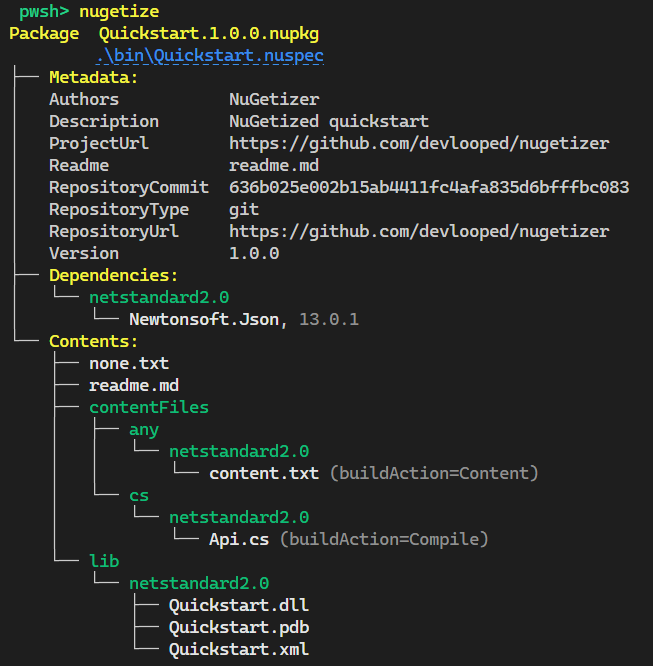
Running nugetize on the project directory will produce:
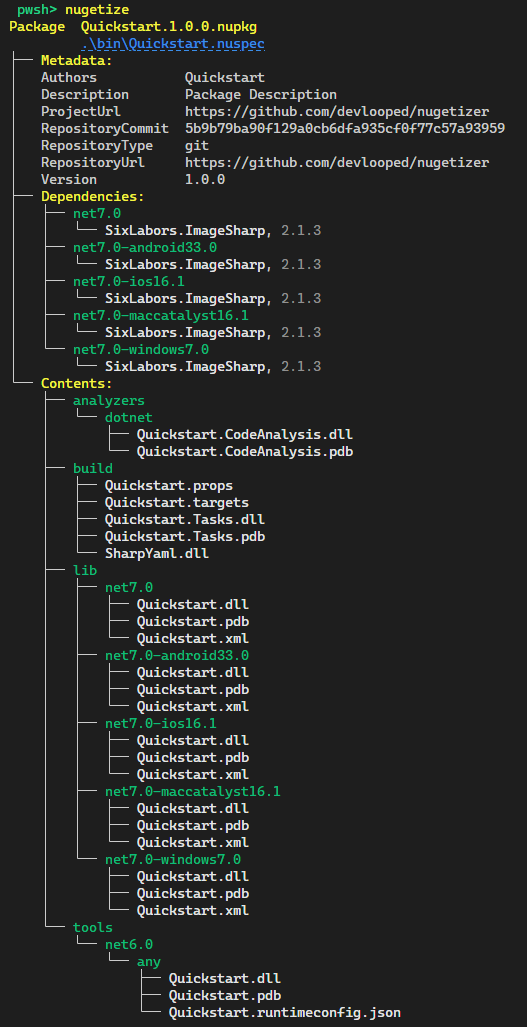
A typical packaging .msbuildproj project for a smart multi-targeted library might look like the following:
<Project Sdk="Microsoft.Build.NoTargets/3.7.0">

  <PropertyGroup>
    <PackageId>Quickstart</PackageId>
    <TargetFramework>netstandard2.0</TargetFramework>
  </PropertyGroup>

  <ItemGroup>
    <PackageReference Include="NuGetizer" />
    <PackageReference Include="Microsoft.SourceLink.GitHub" Version="1.1.1"
                      PrivateAssets="all" />
  </ItemGroup>

  <ItemGroup>
    <ProjectReference Include="..\Analyzer\Quickstart.CodeAnalysis.csproj" />
    <ProjectReference Include="..\Build\Quickstart.Tasks.csproj" />
    <ProjectReference Include="..\Lib\Quickstart.csproj" />
    <ProjectReference Include="..\Tools\Quickstart.csproj" />
  </ItemGroup>

</Project>
And produce the following nugetize tool output:
You can open this sample and run it directly in your browser in a

Learn more about NuGetizer and its capabilities from the project documentation site.
Sponsors