NuGetizer 1.4.2
NuGetizer is a drop-in replacement for the .NET SDK built-in Pack (a.k.a. "SDK Pack") which instantly supercharges your ability to customize and extend the packing process in a consistent and easy to understand process designed and centered around best practices in MSBuild design and extensibility.
Yes, this means you'll never need to write a .nuspec by hand ever again, no matter how complicated or advanced your packing scenarios are.
Comprehensive and intuitive heuristics built from experience building nuget packages for over a decade make getting started with NuGetizer seamless and easy, while still accomodating the most advanced scenarios through plain MSBuild extensibility. Out of the box, NuGetizer supports:
- Drop-in replacement for the built-in .NET SDK Pack
- Packing project references (including transitive references)
- Straightforward support for smart libraries packing needs
- Packing multi-targeted projects, including framework-specific resources and dependencies
- Fast iterative development with complementary dotnet-nugetize command line tool
- Comprehensive diagnostic analyzers to provide guidance on packing best practices
- Consistent and predictable naming for package content inference behaviors:
Pack=[true|false]=> Include/exclude from package (on any item, such asPackageReference,ProjectReference,None,Content, etc.)PackFolder=[folder]=> Name of known folders with special behavior, such asLib,Build,Content,Tools, etc. (as a project property or item metadata)PackagePath=[path]=> Package-relative path (on any item, such asNone,Content, etc.)Pack[Item Type]=[true|false]=> Set default pack behavior for all items of a given type via simple properties (such asPackNone,PackContent,PackBuildOutput,PackDependencies,PackFrameworkReferences,PackEmbeddedResource,PackResourceetc.)
- Packaging projects using
.msbuildprojand Microsoft.Build.NoTargets SDK - SourceLink support to populate repository information in the package
- Automatic
readme.mdinclusion in the package - Support for content includes in readme
- Package validation enabled by default for release multi-targeting packages.
It's strongly recommended that you install the dotnet-nugetize tool to get the best experience with NuGetizer:
dotnet tool install -g dotnet-nugetize
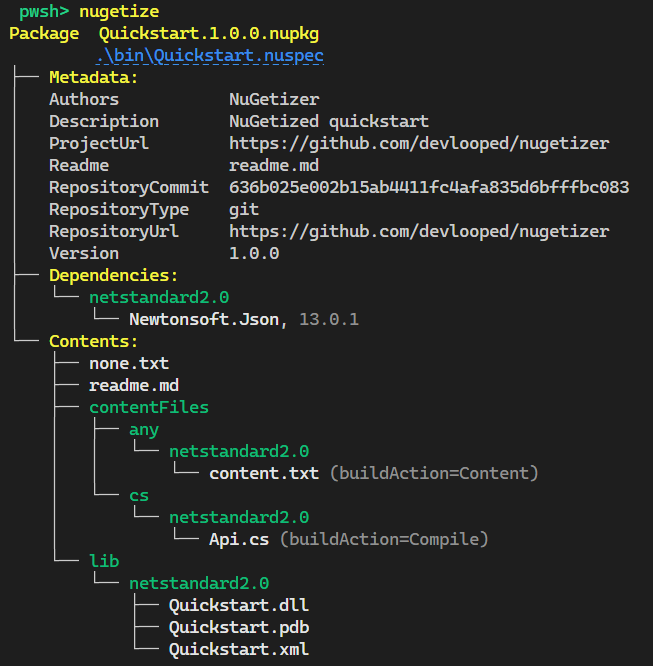
Given the following project:
<Project Sdk="Microsoft.NET.Sdk">

  <PropertyGroup>
    <TargetFramework>netstandard2.0</TargetFramework>
    <GenerateDocumentationFile>true</GenerateDocumentationFile>

    <PackageId>Quickstart</PackageId>
    <Authors>NuGetizer</Authors>
    <Description>NuGetized quickstart</Description>

    <PublishRepositoryUrl>true</PublishRepositoryUrl>
  </PropertyGroup>

  <ItemGroup>
    <PackageReference Include="NuGetizer" />
    <PackageReference Include="Microsoft.SourceLink.GitHub" Version="1.1.1"
                      PrivateAssets="all" />
    <PackageReference Include="Newtonsoft.Json" Version="13.0.1" />
  </ItemGroup>

  <ItemGroup>
    <None Include="none.txt" Pack="true" />
    <Content Include="content.txt" Pack="true" />
    <Compile Update="@(Compile)" Pack="true" />
  </ItemGroup>

</Project>
Running nugetize on the project directory will produce:
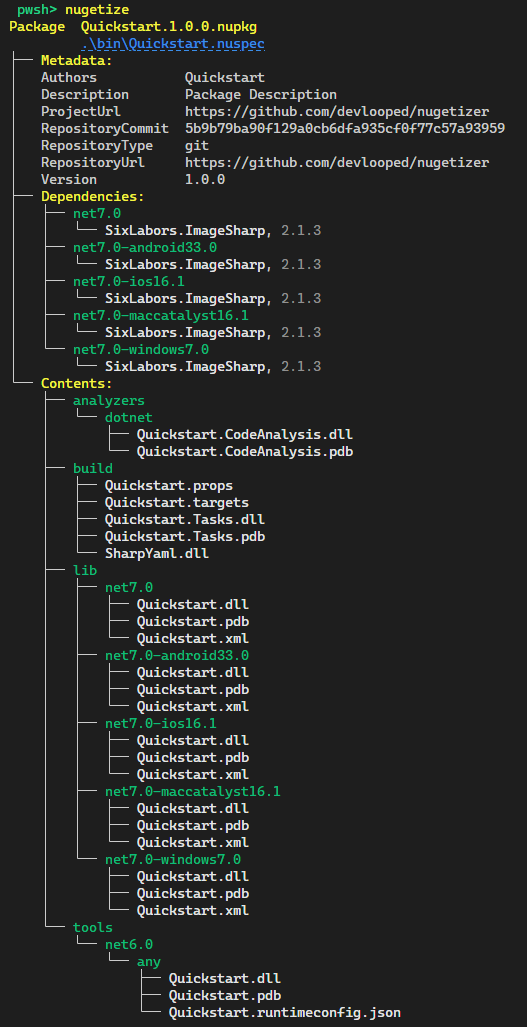
A typical packaging .msbuildproj project for a smart multi-targeted library might look like the following:
<Project Sdk="Microsoft.Build.NoTargets/3.7.0">

  <PropertyGroup>
    <PackageId>Quickstart</PackageId>
    <TargetFramework>netstandard2.0</TargetFramework>
  </PropertyGroup>

  <ItemGroup>
    <PackageReference Include="NuGetizer" />
    <PackageReference Include="Microsoft.SourceLink.GitHub" Version="1.1.1"
                      PrivateAssets="all" />
  </ItemGroup>

  <ItemGroup>
    <ProjectReference Include="..\Analyzer\Quickstart.CodeAnalysis.csproj" />
    <ProjectReference Include="..\Build\Quickstart.Tasks.csproj" />
    <ProjectReference Include="..\Lib\Quickstart.csproj" />
    <ProjectReference Include="..\Tools\Quickstart.csproj" />
  </ItemGroup>

</Project>
And produce the following nugetize tool output:
You can open this sample and run it directly in your browser in a

Learn more about NuGetizer and its capabilities from the project documentation site.
Open Source Maintenance Fee
To ensure the long-term sustainability of this project, use of NuGetizer requires an Open Source Maintenance Fee. While the source code is freely available under the terms of the MIT License, all other aspects of the project --including opening or commenting on issues, participating in discussions and downloading releases-- require adherence to the Maintenance Fee.
In short, if you use this project to generate revenue, the Maintenance Fee is required.
To pay the Maintenance Fee, become a Sponsor at the corresponding OSMF tier (starting at just $10!).
Sponsors